

Home / Solutions / Real estate sites
Real estate site privacy · Updated November 2026
Real Estate Site Removal: How to Remove Your Home Photos and Info From Zillow, Redfin, Realtor.com and Google
You usually cannot delete a home’s property page from a real estate site, but you can often hide or remove the listing photos, floor plans and tours. Claim the home as its verified owner on Zillow (which also updates Trulia), Redfin and Realtor.com, ask the listing agent to hide the photos in the MLS, then ask Google and Bing to refresh their copies.
Quick facts
- Owner toolsZillow, Redfin, Realtor.com
- Cost on the sitesFree
- What it doesHides or removes photos; the property page stays
- Info requiredFree account plus ownership verification
- TruliaFollows Zillow (same company)
- Active listingsOnly the listing agent or MLS can change photos
- Sale price, tax dataPublic records; usually stays
- Google and BingRequest a refresh after each site changes
- Last reviewedNovember 2026
The short answer
Can you remove your home from real estate sites?
Partly. Zillow, Redfin and Realtor.com all treat a house as a permanent record built from public data, so the address, beds and baths, square footage, sale history and tax figures normally stay visible. What owners can control is the most revealing part: the interior photos, floor plans and 3D tours left over from the last time the home was listed. Each major site gives a verified owner a way to hide or remove those, and the listing agent can hide them at the source, the Multiple Listing Service (MLS) that feeds most sites.
Owner names are a separate problem. Some sites, such as BlockShopper, publish buyer and seller names from deed records, and people-search sites tie your name to your address. Those follow their own opt-out rules, covered in our people-search removal guides and the full list of opt-out guides.
Why your home is on these sites
When a home is listed, the agent uploads photos, a description and often a floor plan or virtual tour to the local MLS. The MLS shares that data with portals like Zillow, Redfin and Realtor.com and with brokerage websites. Redfin explains in its help center that after a sale the photos stay archived in the MLS, and the MLS feeds keep including them unless they are hidden or removed on the MLS side.
Separately, the sites pull county assessor and recorder data, which is why a home that was never listed still has a page, and why a page survives after the photos come down. Satellite and Street View imagery comes from Google or Apple, not from the real estate site.
What a property listing can show
- Interior and exterior listing photos from past sales or rentals
- Floor plans and 3D or Matterport tours showing room layout, doors and windows
- Sale price history, tax assessments and estimated value
- Beds, baths, lot size, year built and permit history
- Owner or buyer names on some sites that publish deed records
- Google Street View or aerial images of the house
- Rental listing photos from property managers
Site by site
What each major real estate site lets owners remove
The table summarizes what each site publishes about owner controls as of November 2026. Where a site does not publish a self-serve option, removal is handled case by case through its support team or the listing agent.
| Site | Owner self-serve? | What you can do | Watch out for |
|---|---|---|---|
| Zillow | Yes, after you claim the home | In Owner View, open Edit Facts and tick the box to hide photos displayed on the Zillow page, then save | Hidden photos are replaced by a Google Street View image if one exists; Zillow cannot blur Street View itself |
| Trulia | Through Zillow | Hiding photos on Zillow also removes them from Trulia, because Trulia receives its photos from Zillow | Nothing separate to claim for photos |
| Redfin | Yes, on the website, after verification | My Homes, Edit Photos, Hide listing photos, Yes, Hide Photos, then Save | The first photo (hero shot) stays unless you message Redfin support; floor plans and 3D tours on sold homes go through support |
| Realtor.com | Claim through My Home; removal by request | Claim the home, then request photo removal; MLS guidance says the listing must be in a permanent off-market status (closed, expired or canceled) first | You may be asked for documents showing your name and the property address |
| Homes.com | No owner photo tool published | Ask the listing agent to hide photos in the MLS, then contact Homes.com support | Results vary; keep a record of every request |
| Brokerage and IDX sites | No | The listing agent or MLS hides the photos at the source and the feeds update | Some MLSs keep photos for comparables; ask your agent what your MLS allows |
Step by step
How to remove house photos from real estate sites
Work in this order. Fixing the MLS first stops the photos from flowing back into portals and brokerage sites, then each portal’s owner tools clean up what is already published.
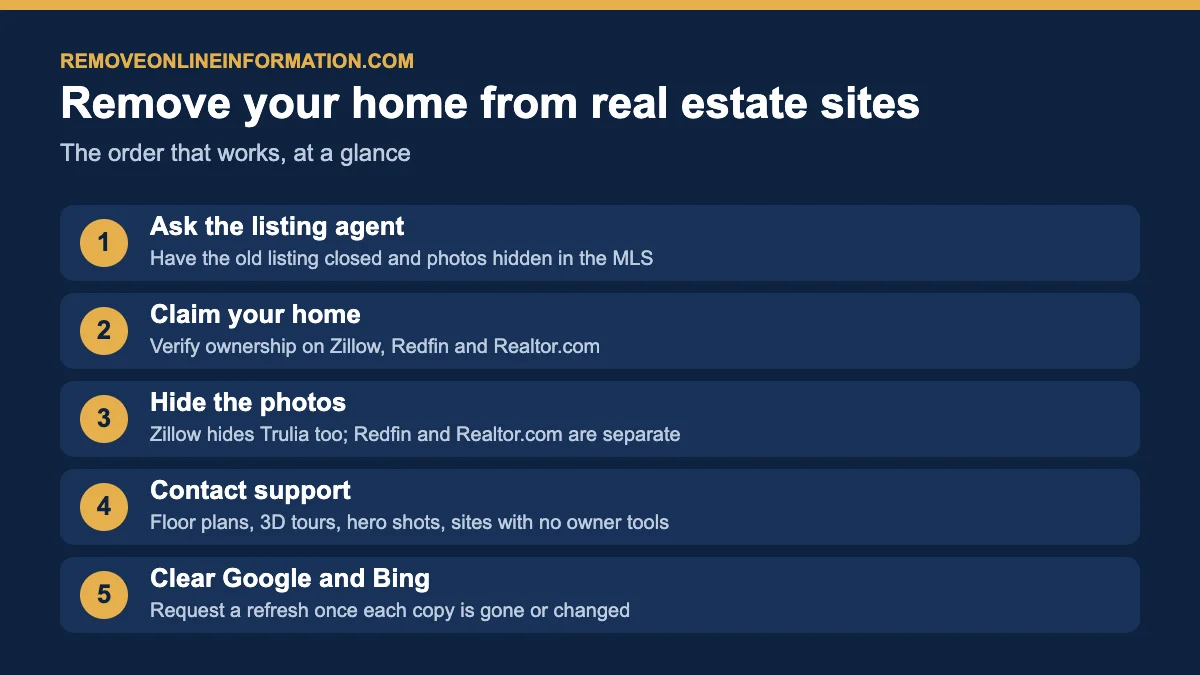
- Find every copy. Search your full address in quotes on Google and Bing, then run site searches such as site:zillow.com, site:redfin.com, site:realtor.com and site:homes.com with your street address. Check Google Images too. Save each URL in a list so you can confirm removals later.
- Ask the listing agent or brokerage to hide the photos in the MLS. Contact the agent who listed the home when you bought it (your own buyer’s agent can make the request for you). Ask them to close out the listing and hide or remove the photos, floor plans and virtual tour. If the agent does not respond, ask for the brokerage’s managing broker.
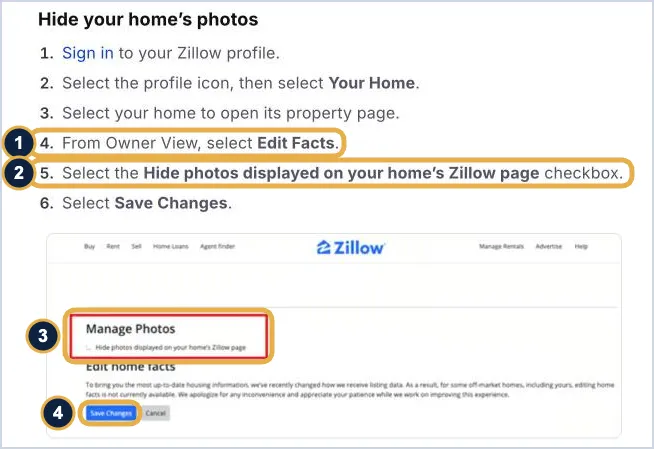
- Claim your home on Zillow and hide the photos. Sign in, open your home from Your Home, choose Edit Facts in Owner View, tick Hide photos displayed on your home’s Zillow page and save. If the home is not listed under Your Home, open its property page, choose More, then Claim ownership and answer the verification questions. This also clears the photos from Trulia.
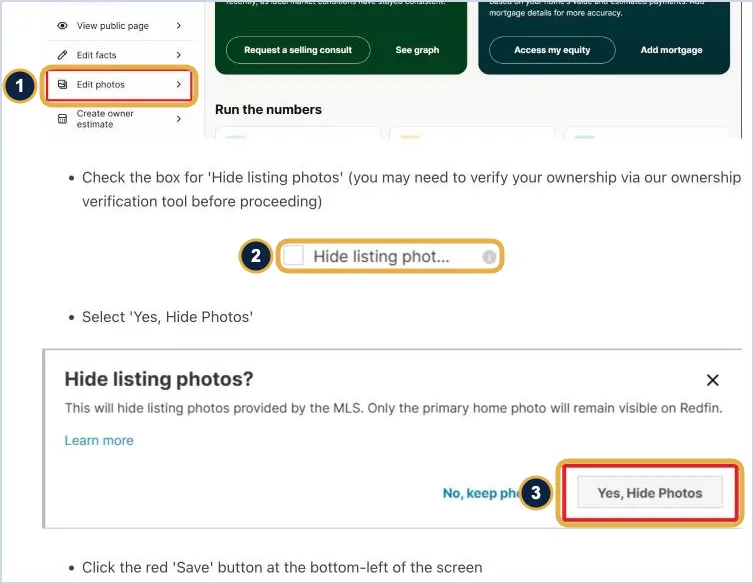
- Claim your home on Redfin and hide the listing photos. Use Redfin’s website, open My Homes from the menu under your name, select the home, choose Edit Photos, tick Hide listing photos, confirm Yes, Hide Photos and click Save. Message Redfin support to remove the remaining hero shot, a floor plan, a 3D tour or a photo someone else uploaded.
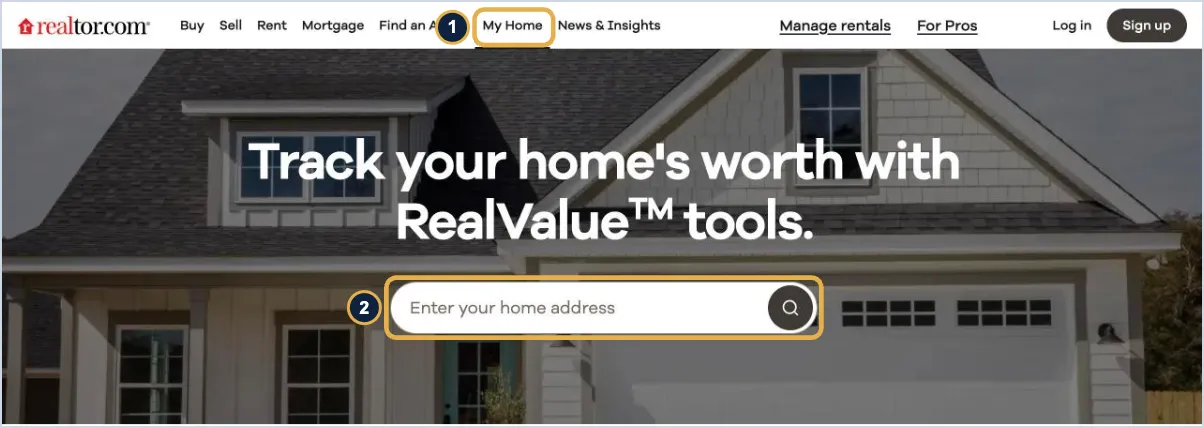
- Claim your home on Realtor.com and request removal. Search your address from Realtor.com’s My Home page, claim and verify the home, then request photo removal. If the option is unavailable, contact Realtor.com customer care with proof that you own the property.
- Handle the smaller sites. Homes.com, HomeSnap, Movoto, Estately and similar portals usually update once the MLS hides the photos. If they do not, contact each site’s support. For sites that publish owner names, follow the site guide, such as our BlockShopper removal guide.
- Request Street View blurring if you want the exterior hidden too. In Google Maps Street View, use Report a problem and ask to blur your home. Google treats the blur as permanent, so think it through before submitting.
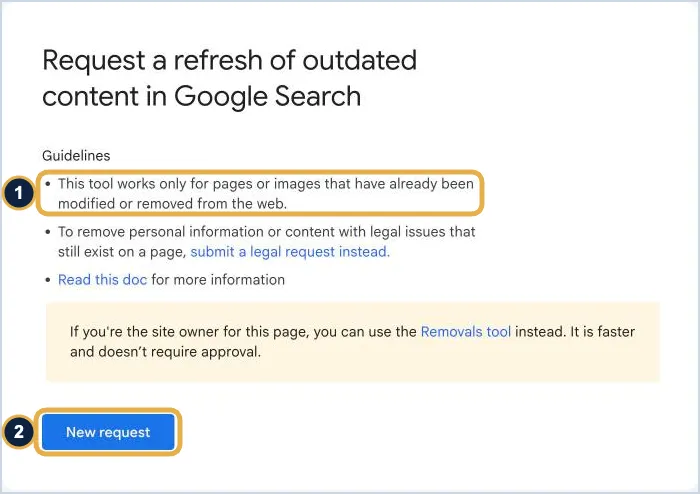
- Clear Google and Bing. Once a photo or page has changed, submit the old URL or image to Google’s Refresh Outdated Content tool and Bing’s content removal tool so search results and image results catch up.
Where to click on each site
Zillow: after claiming the home, the hide option sits under Manage Photos in Edit Facts.
Redfin: Edit photos in the owner menu, the Hide listing photos checkbox, then the confirmation.
Realtor.com: start from the My Home tab and search your address to claim the home.
Stuck at verification or getting no reply? Ask us for a free, confidential assessment or call (855) 581-5827.
Support requests
What to write when you contact a site or agent
Owner tools cover most cases. When they do not, such as a hero shot that stays, a floor plan, a 3D tour, a rental listing or a site with no owner dashboard, a short, specific request works best. Give the exact URL, say you are the current owner, and name the items to remove.
You bought the home and the old listing photos remain
This is the most common ground. Say when you closed, that the home is not for sale or rent, and that the photos show the interior layout of your private residence. Most sites and agents accept this without debate once ownership is verified.
Safety or security concerns
Floor plans and interior photos reveal entrances, windows, alarm panels and where valuables or children’s rooms are. If you have a specific safety concern, such as a stalker, a public-facing job or a protective order, say so briefly. You do not need to share details you are not comfortable sharing.
Photos or tours uploaded without your consent
Redfin, for example, tells owners to contact its support when someone else uploads an image to their home. The same approach works for 3D tours and rental photos that came from a third-party feed.
The listing shows the wrong home or wrong details
Ask the site to correct the coordinates, photos or facts. Accuracy requests are usually processed quickly and can be combined with a photo request.
Sample request
Hello, I am the current owner of [street address], which I purchased on [closing date]. The property page at [URL] still shows interior photos, a floor plan and a virtual tour from the previous sale. The home is not for sale or rent, and these images expose the layout of my private residence. Please remove or hide all listing photos, the floor plan and the tour from this page. I can verify ownership with a deed or a recent tax bill if needed. Thank you.
Know your options
Hiding vs removal vs de-indexing vs suppression
People use these words interchangeably, but they lead to very different results. Pick the one that matches what you actually need gone.
| Option | What happens | Who does it | Best for |
|---|---|---|---|
| Hiding photos | Photos disappear from public view; the site may keep them on file | Verified owner, using the site’s owner tools | Zillow, Trulia, Redfin listing photos |
| Removal by request | The site deletes specific items such as a floor plan, tour or hero shot | Site support, sometimes after proof of ownership | Items owner tools do not cover; Realtor.com |
| MLS hide or close-out | Photos stop flowing to portals and brokerage sites that use the feed | Listing agent or the MLS | Stopping copies at the source |
| De-indexing | The page or image drops out of Google or Bing results; the site itself is unchanged | Google or Bing, through refresh or removal tools | Cleaning up search after a site changes |
| Suppression | Other content outranks the listing; nothing is deleted | You or a reputation firm | Pages that cannot be removed, such as a property page with your name |
| Address confidentiality | Some states let eligible people, such as survivors of abuse, shield an address in certain public records | State program, by application | Owner names in official records; the sites themselves are separate |
Remove house photos from Google search
Google does not host the photos; it shows copies of what the sites publish. Redfin notes that after it removes images, Google and Bing can take some time to re-crawl the page and notice. Once a site has hidden your photos, speed that up with Google’s Refresh Outdated Content tool: paste the property page URL, or for Google Images, the image URL. The tool only works for pages or images that have already changed or been removed.
If a page still shows your phone number, email or home address alongside personal details, Google’s Results about you tool may let you request removal from search. Our guide to Google’s webpage removal request tools explains each option.
Remove your home from AI answers
AI assistants and AI search features summarize what they find on the open web and in search indexes. None of the major real estate sites publish a separate opt-out for AI tools, so the reliable route is to remove the source: hide the photos on each site, have the MLS hide them, then let search engines refresh. Once the source page changes and is re-crawled, AI answers that cite it tend to follow.
If an AI tool is repeating your address with your name, the source is usually a people-search or public-records site rather than Zillow or Redfin. Start with our public records removal hub, the background check site guides and the AddressSearch opt-out guide. For a done-for-you option across data brokers, see Defamation Defenders’ personal information removal service.
How long it takes
None of the major sites publish a guaranteed turnaround. Owner tools apply when you save, but verification and support tickets add time, and search engines lag behind.
| Step | Timing |
|---|---|
| Zillow or Redfin hide after verification | Not published; owner setting applies when saved |
| Ownership verification | Not published; case by case |
| Realtor.com removal request | Not published; listing must be off market first |
| MLS hide by listing agent | Depends on the agent and the MLS |
| Support requests (floor plans, tours, hero shot) | Not published; case by case |
| Google and Bing catching up | Typically days to a few weeks after the site changes |
If a request is denied or stalls
- Verification fails: sites check ownership against public records, which lag behind recent closings. Wait for the deed to record or offer a deed or tax bill to support.
- The listing is still active: sites cannot change MLS photos on an active listing. Only the listing agent can.
- The agent will not act: go to the managing broker, then to the MLS itself.
- Photos come back: a re-listing, a new rental listing or a third-party feed can repopulate them. Recheck your URL list every few months.
- A site has no owner tools: send the sample request above to its support address and keep copies.
- Google still shows the photo: confirm the site really removed it, then submit the exact image URL for refresh.
Want it handled? Get a free removal assessment.
DIY or done for you
Do it yourself or have RemoveOnlineInformation.com handle it
Most homeowners can clear Zillow, Trulia and Redfin in an afternoon. It gets harder when photos sit on a dozen smaller portals, the listing agent has moved on, verification keeps failing, or your name and address also appear on people-search sites.

| Do it yourself | RemoveOnlineInformation.com | |
|---|---|---|
| Cost | Free on each site | Free, confidential assessment and a firm quote before any work |
| Finding every copy | You search each portal, broker site and image result | We build the URL list for you |
| Ownership verification and tickets | You handle each site’s process and follow-ups | We prepare and track each request |
| Listing agent and MLS | You chase the agent or brokerage | We draft the request and follow up |
| Google and Bing cleanup | You submit refresh requests | Included in the plan we quote |
| Names and addresses on people-search sites | Separate opt-outs per site | Can be added to the same assessment |
or call (855) 581-5827
FAQ
Real estate site removal: frequently asked questions
Free guides
Real estate site removal guides
Step-by-step instructions for each site, from the big portals to the smaller listing and property data sites that copy them.
Realtor.com
Claim through My Home and request photo removal once off market.
See all opt-out guides · People-search removal · Public records removal
Want your home off real estate sites without the runaround?
Send us the property links. We will tell you what can be hidden, removed or de-indexed, and give you a firm quote before any work. Free and confidential.
RemoveOnlineInformation.com is not a law firm and does not provide legal advice. We are not affiliated with Zillow, Trulia, Redfin, Realtor.com, Homes.com or any other site named on this page, and we cannot alter official property records. Site policies and steps described here are as of November 2026 and can change; check each site’s help center before you act. Do not include passwords, ID numbers or intimate images in your first message.