

Home / Solutions / Background check removal
Background check removal hub
Background Check Removal: How to Remove Yourself From Background Check Sites and Google
To remove yourself from background check websites, send a free opt-out request to each site (or to the parent company that runs several of them), confirm it from your inbox, then ask Google to drop the old result once the profile page is gone. Start with the big networks: one PeopleConnect request covers TruthFinder, Intelius, Instant Checkmate and US Search. Every site below links to our step-by-step opt-out guide.
Quick facts
- Cost to opt outFree on every site in this hub
- Account neededNo; most sites ask for an email address
- Biggest single requestPeopleConnect Suppression Center (4 sites)
- Info you will needName, city and state, profile URL, a working email
- Removes court or police recordsNo, only the site’s copy of them
- Processing timeVaries by site; see the timeline table
- Can profiles returnYes, when new public records are imported
- Last reviewedNovember 2026
The short answer
Can you remove yourself from background check sites?
Yes. Consumer background check sites such as BeenVerified, TruthFinder, Instant Checkmate, Intelius, Spokeo and MyLife all run a free opt-out or suppression process, and none of them require you to buy a report or create a paid account to use it. What an opt-out does is hide or delete that site’s profile about you. It does not erase the underlying public records (court files, property deeds, voter rolls, arrest logs), and it does not stop a different site from publishing its own copy.
That is why background check removal works best as a sweep rather than a single request: find every report that exists, clear the parent networks first, submit the remaining opt-outs one by one, then clean up Google and re-check every couple of months. If you want the wider picture first, our people search directory removal hub and public records removal hub cover the sites that feed and copy background reports.
Two kinds of background checks. The sites in this hub are people-search sites anyone can use. Employers and landlords are supposed to use regulated screening companies that follow the Fair Credit Reporting Act (FCRA). Opting out of a people-search site does not change what a regulated screening company reports; for that you dispute errors with the screening company or get the record sealed or expunged at the court. Both routes are explained below.
Free opt-out guides
Background check site opt-out guides
Each guide shows where the site’s real opt-out form lives, what details it asks for, how verification works and what to do if your request is ignored. Start with the sites that rank for your name on Google, then work down the list.
BeenVerified
Search, choose your record, confirm by email; check its sister brands too.
TruthFinder
Runs through the PeopleConnect Suppression Center, not truthfinder.com.
Instant Checkmate
Same PeopleConnect request as TruthFinder; one form covers both.
US Search
Covered by PeopleConnect; check it after your suppression is live.
Advanced Background Checks
Free-to-view profiles that often rank high on Google.
SmartBackgroundChecks
Free profile pages with addresses, phones and relatives.
PublicBackgroundChecks
Background-report site with its own removal form.
BackgroundsOnline
Paid background reports; opt-out handled by request.
More background and public-record sites: Radaris · Whitepages · FastPeopleSearch · TruePeopleSearch · Public Records Now · Public Data Check · Instant People Finder · BackgroundFinder · LexisNexis · QuickPublicRecords
Save time
Which background check sites share one opt-out
Many background check brands are owned by the same few companies and pull from the same database. Clearing the parent network first means fewer forms. Ownership and coverage change, so always search each brand again after your request is confirmed.
| Network | Brands people usually find | Where the opt-out happens | What to know |
|---|---|---|---|
| PeopleConnect | TruthFinder, Instant Checkmate, Intelius, US Search | PeopleConnect Suppression Center (suppression.peopleconnect.us) | One verified request covers the four named sites. PeopleConnect does not accept requests from third-party agents, so the person in the report has to complete it. ZabaSearch is not on its list; check it separately. |
| The Lifetime Value Co. | BeenVerified, PeopleLooker, PeopleSmart, NumberGuru, Ownerly | BeenVerified opt-out search page; brand-specific pages for the others | Guides disagree on whether one opt-out clears every sister brand, so treat each brand as its own task and search it after you opt out. |
| Spokeo | Spokeo | spokeo.com/optout with your profile URL | One URL per request; duplicate profiles need separate requests. |
| Stand-alone sites | MyLife, CheckPeople, Radaris, SmartBackgroundChecks and others | Each site’s own form or privacy email | See the matching guide above; some require a profile URL, some a reason, some an email confirmation. |
What background check sites are and why you are on them
Background check sites are data brokers that buy, scrape and match records into a single report per person. Typical sources include county court indexes, property and tax records, voter files, marriage and divorce indexes, phone directories, marketing lists and other brokers. Because the matching is automated, one person can have several overlapping reports, and two people with similar names can be merged into one.
You did not have to sign up for anything to appear. Being an adult with a lease, a phone number, a car registration or a court case is usually enough. That is also why reports reappear: when a county posts new records or a broker buys a fresh list, the site rebuilds profiles, sometimes including people who already opted out.
Regulators have pushed back on how these reports are marketed. In 2023 the FTC said TruthFinder and Instant Checkmate had operated as consumer reporting agencies and had misled users about the accuracy of their reports and about being able to remove or flag information. If you are researching how these reports affect hiring and renting, read our explainer on how background check data is used in employment and housing decisions.
What a background report usually shows
- Full name, aliases, age and partial date of birth
- Current and past home addresses, often going back decades
- Phone numbers and email addresses
- Relatives, roommates and associates, with links to their reports
- Court cases, liens, judgments, bankruptcies and traffic records
- Arrest and booking records and, on some sites, mugshots
- Property ownership, vehicle and business filings
- Social media profiles and photos matched to your name
Free preview pages are what Google indexes, so even a site that charges for the full report can expose your address and relatives to anyone who searches your name. If arrests or court cases are the problem, the source pages matter more than the report: see our court case removal guides and mugshot removal hub.
Step by step
How to remove yourself from background check sites
This is the order that clears the most exposure for the least effort. Set aside an hour for the first pass; most of that time is waiting for verification emails.
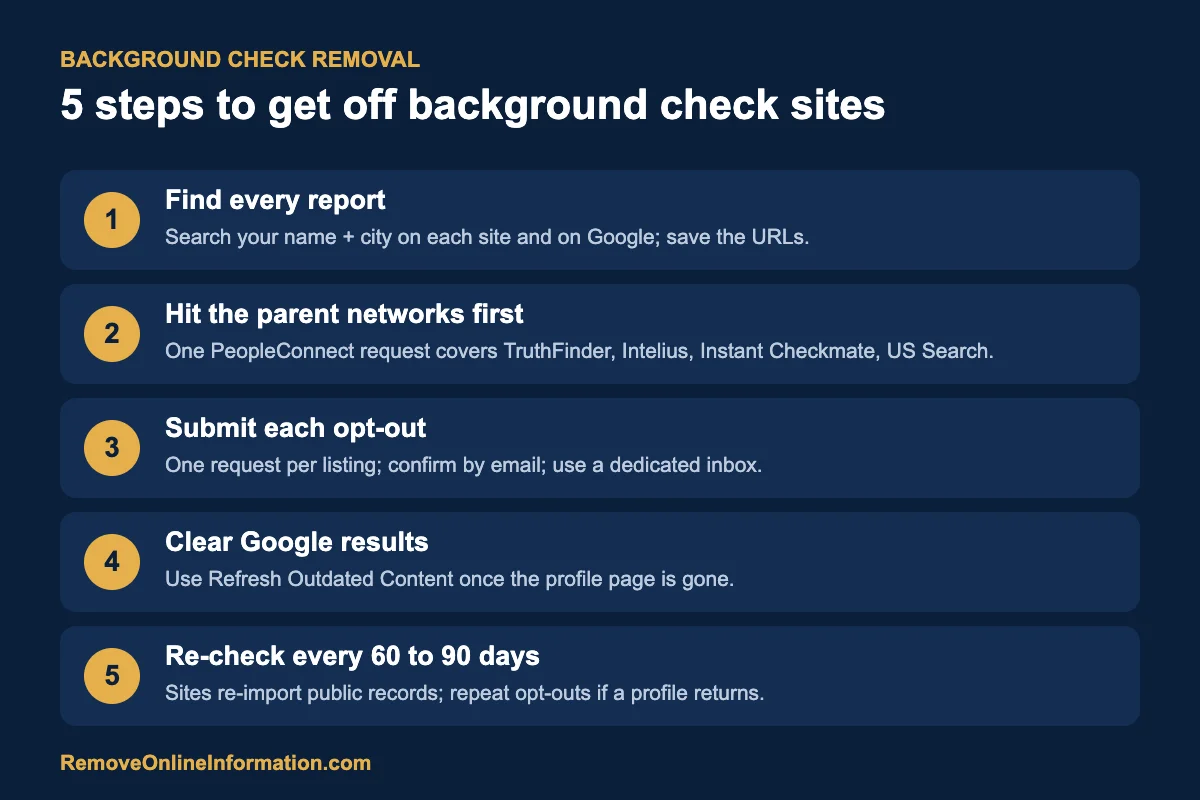
- Make a list of every report. Search Google for your full name in quotes plus your city, then add words like background check, address and phone. Also search each major site directly. Copy every profile URL into one document so nothing gets missed.
- Use a dedicated email address. Most opt-outs send a verification link. A separate inbox keeps those messages together and avoids handing your main email to another broker. Check spam and promotions folders for the links.
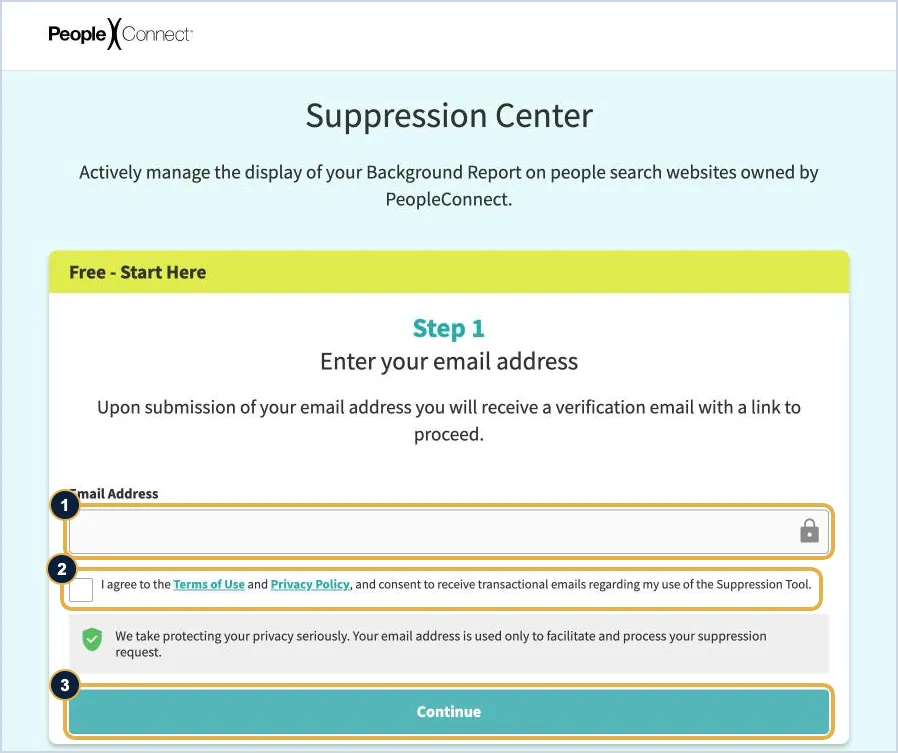
- Clear the PeopleConnect network first. Go to the PeopleConnect Suppression Center, enter your email, accept the terms and open the verification link. You will be asked to confirm details such as your legal name and date of birth, then set the matching report to suppressed. That one request covers TruthFinder, Instant Checkmate, Intelius and US Search.
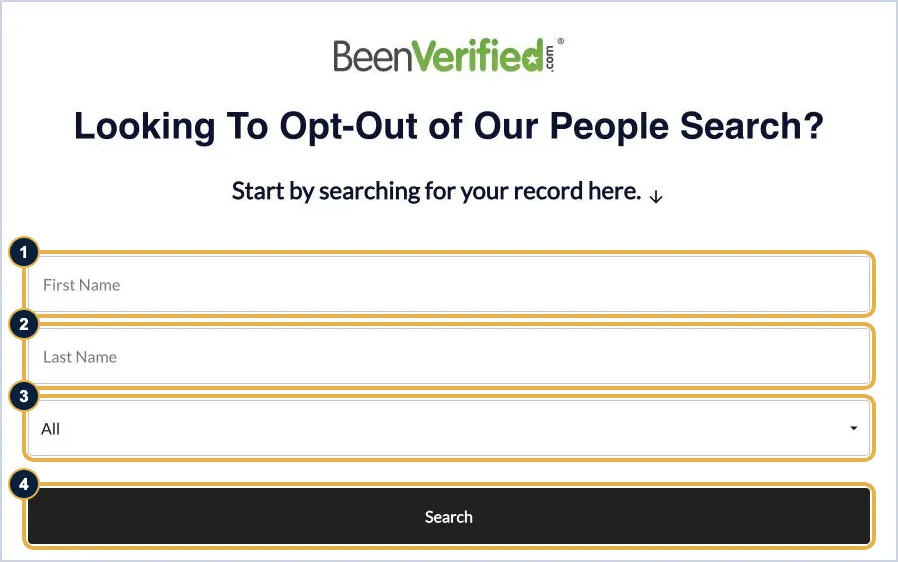
- Opt out of BeenVerified and its sister brands. On the BeenVerified opt-out page, search your first name, last name and state, choose your record, enter your email and click the verification link it sends. Repeat for each duplicate record, then search PeopleLooker and the other sister brands separately.
- Work through the remaining sites one by one. Use the guides above for Spokeo, MyLife, CheckPeople, Radaris and the free profile sites. Submit one request per profile URL. Where a form asks for a reason, use the wording in the next section.
- Record what you sent. Note the date, the site, the URL and any confirmation number or screenshot. If a profile is still live after the site’s stated window, you will need this to follow up.
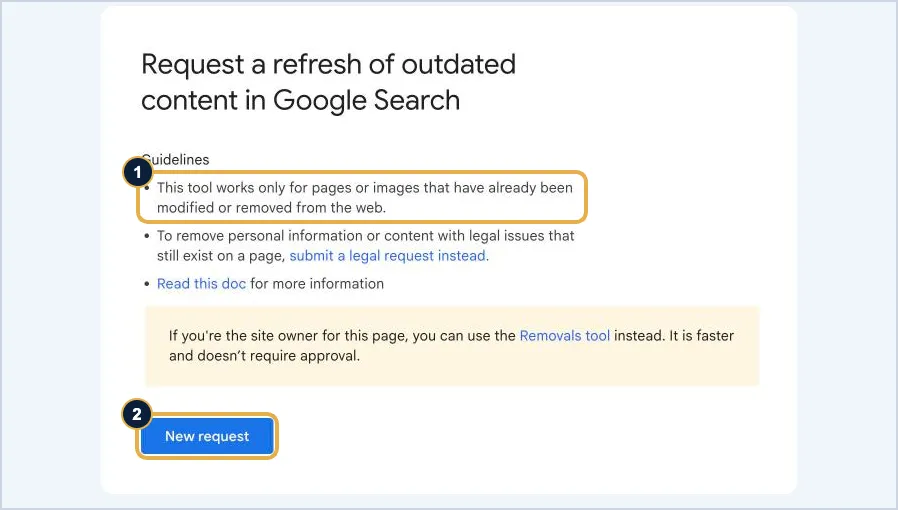
- Clear Google and Bing. Once a profile page shows a removal notice or a 404, submit the URL to Google’s Refresh Outdated Content tool and Bing’s Content Removal tool so the old snippet stops appearing.
- Re-check every 60 to 90 days. Search your name again on Google and on the largest sites. Re-submit any profile that has come back, and add new sites to your list as they appear.
Reason fields and emails
What to write when a background check site asks why
Most large sites process an opt-out without a reason. Smaller sites, privacy inboxes and appeals often ask for one. Keep it short, factual and specific to the profile URL.
Privacy and safety
You do not need to prove a threat. Saying the profile exposes your home address, phone number and relatives, and that you do not consent to it being published, is enough for most opt-out teams. If you are a survivor of stalking or abuse, a public servant or a healthcare worker, say so; several state laws give extra protection to those groups.
Inaccurate or mixed-up records
If the report attaches someone else’s case, address or relatives to your name, list each wrong item and say the report merges two different people. Ask for the profile to be removed rather than corrected, since a corrected profile is still a profile.
Sealed, expunged or dismissed cases
Attach or describe the court order and the case number. Sites that show court data often remove sealed or expunged cases faster when you supply proof. For a regulated background check, send the same order to the screening company as an FCRA dispute.
State privacy rights
If you live in a state with a consumer privacy law, such as California, Colorado, Connecticut, Virginia or Texas, you can say you are exercising your right to delete. California residents can also use the state’s DROP tool described below.
Sample removal request
Subject: Removal request for profile [profile URL]
Hello, I am the person described in the profile at [profile URL]. I do not consent to my name, home address, phone number, relatives or court information being published or sold. Please remove this profile and any duplicate profiles about me, suppress my information from future reports, and confirm in writing when this is complete. [Optional: I am a California resident exercising my right to delete under the CCPA.] Thank you, [Name]
Send only what the site needs to find the right profile. Do not send ID documents unless the site requires them, and if it does, cover the ID number and photo where allowed.
Choose the right fix
Opt-out vs. FCRA dispute vs. sealing vs. suppression
Background check removal is really four different tools. Using the wrong one is the most common reason people feel stuck.
| Option | What it changes | Best for | Limits |
|---|---|---|---|
| Opt-out or suppression on the site | Hides or deletes that site’s profile | People-search reports, addresses, phones, relatives | Only one site at a time; profiles can be rebuilt from new data |
| FCRA dispute with a screening company | Corrects or removes inaccurate items in a regulated report | Wrong records in an employment or tenant screening report | Accurate, reportable records stay; does not touch people-search sites |
| Sealing or expungement through the court | Restricts access to the official record | Eligible arrests, dismissed cases and some convictions | Does not delete copies already on the web; you still send the order to each site |
| Search suppression or de-indexing | Pushes down or drops results in Google | Pages that cannot be removed at the source | The page can still exist and be found directly |
| State deletion tools such as California DROP | Sends one deletion request to registered data brokers | California residents with many broker profiles | Only registered brokers; some public and FCRA-covered data is exempt |
If the record itself is the issue, start at the source. Remove Court Records publishes guides for removing court records from case-law and docket sites, and Remove-Arrests.org focuses on arrest record and mugshot removal. A sealed or expunged case is also the strongest proof you can give a background check site.
Remove background check results from Google
Google does not control what background check sites publish, but it does control what it shows. Once a site removes your profile, the old title and snippet can linger in results for a while. Submit the dead URL to Google’s Refresh Outdated Content tool so Google re-crawls it and drops the result.
If a profile is still live and shows your home address, phone number or email, Google’s Results about you tool lets you request removal of that result from Google Search even while the page exists. It does not delete the page, so keep the site opt-out going in parallel. Bing has a similar content removal form for pages that are already gone.
Background reports in AI answers
AI assistants and AI search summaries draw on the same indexed pages. When someone asks an assistant about you, a live background check profile can be summarized or quoted. None of the major background check sites publish a separate process for AI tools, so the reliable fix is the same: remove the source profile, clear it from Google and Bing, and the material stops being retrievable for new answers over time.
If an assistant repeats something false, most offer a feedback or report option on the answer. Note the date and wording, then focus on removing the page it came from. Our guide to opting out of data brokers covers the wider set of sites AI tools tend to pull from.
Tip: search your name in a private browser window after each round of removals. Signed-in results can hide pages that strangers still see.
Laws and timing
California DROP and state privacy rights
California residents also have a statewide tool. The Delete Request and Opt-out Platform (DROP), run by the California Privacy Protection Agency, opened to consumers on January 1, 2026 and lets you send one deletion request to every registered data broker. Brokers had to start processing DROP requests on August 1, 2026 and must check the platform at least every 45 days. DROP only reaches registered brokers and excludes some categories of data, so keep using site opt-outs for profiles that stay live.
Outside California, privacy laws in states such as Colorado, Connecticut, Virginia, Texas and Oregon give residents a right to delete personal data held by covered companies. People-search sites often apply the same opt-out to everyone, but citing your state law in a follow-up email can help when a request stalls.
How long background check removal takes
| Step | What the site or agency says | What to expect |
|---|---|---|
| PeopleConnect Suppression Center | No processing time published | Independent guides commonly report about 48 hours after you confirm |
| BeenVerified opt-out | No processing time published | Commonly reported within a few days of clicking the verification link |
| Other background check sites | Varies; see each guide | From a day to several weeks; email-only requests are slowest |
| Google after the page is gone | Depends on re-crawl | Typically days to a few weeks after a Refresh Outdated Content request |
| California DROP | Brokers must process requests at least every 45 days | Results arrive in cycles, not all at once |
| FCRA dispute with a screening company | Generally 30 days to investigate under federal law | You receive the results in writing and an updated report if anything changes |
If a profile comes back
Re-listing is the most common complaint about background check removal. It usually happens for one of three reasons: the site imported a new record with a slightly different name, address or age, so it built a new profile that your suppression does not match; a sister brand you never opted out of is feeding the same data; or a new site started publishing a copy.
Compare the new URL with the one you removed. If it is a new profile ID, submit a fresh opt-out for it. If the old URL is back, reply to your original confirmation email with the date and URL and ask the site to honor the earlier request. Keep a log; it makes repeat requests faster and gives you something to cite under a state privacy law.
Why opt-outs stall
- The verification email went to spam or expired before you clicked it
- You submitted a search page URL instead of the profile URL
- The details you entered did not match the report closely enough
- Duplicate profiles exist and only one was removed
- The site wants a reason or proof, such as a court order, and the request had none
- A third party submitted the request and the site only accepts requests from the person themselves
Fix the issue and resubmit. If a site does not respond after two attempts, a short email to its privacy address citing your earlier requests usually gets a human reply.
Short on time? We can find every background report and handle the opt-outs for you. Get a free removal assessment or call (855) 581-5827.
Your options
DIY background check removal vs. RemoveOnlineInformation.com
Doing it yourself is free and works well if you have a handful of profiles and time to re-check them. Hand it off when the list is long, the reports include court or arrest data, or a profile keeps coming back.

| Do it yourself | RemoveOnlineInformation.com | |
|---|---|---|
| Cost | Free | Free, confidential assessment and a firm quote before any work |
| Finding reports | You search each site and Google | We map every background check and people-search profile we can find for your name |
| Opt-outs | One form and one verification email per profile | We prepare and track each request and follow up on stalled ones |
| Court and arrest data | You contact each source site | We identify the source pages and the best route for each |
| Google cleanup | You submit each dead URL | We handle outdated-result requests as profiles come down |
| Re-listing | You re-check every couple of months | Ongoing monitoring and re-removal are part of our removal service |
or call (855) 581-5827. If you would rather work with a full-service reputation firm, Defamation Defenders also offers a background check removal service.
FAQ
Background check removal: frequently asked questions
Want us to clear your background check profiles?
Send us your name and any background check links you have found. We will map every profile, tell you what can be removed and how, and give you a firm quote before any work. The assessment is free and confidential.
- Every background check and people-search profile we can find
- Court, arrest and address data traced to its source
- Google and Bing cleanup as profiles come down
What to send us
- The background check or people-search links you have found
- The names, cities and phone numbers people search you by
- What you want gone: the whole profile, an address, a case
Do not include passwords, ID numbers or Social Security numbers in your first message.
RemoveOnlineInformation.com is not a law firm and does not provide legal advice. We are not affiliated with BeenVerified, PeopleConnect, TruthFinder, Instant Checkmate, Intelius, Spokeo, MyLife or any other site named on this page, and opting out does not alter official court or government records. Site policies and opt-out steps described here are as of November 2026 and can change without notice.