
Home / Opt-out guides / LocalCrimeNews.com
California arrest record removal guide
LocalCrimeNews.com Removal: How to Remove Your Arrest Record From Local Crime News and Google
Local Crime News lets you unpublish your own arrest record for free. Open the arrest detail page, click the red Unpublish Record button, confirm your name and arrest date, enter your date of birth for verification and submit. The site says requests typically take 2 to 5 business days. Send one request per record, then clear the old page from Google and Bing. Our mugshot removal services cover listings on mugshot sites and in Google results.
Quick facts
- Removal formUnpublish Record button on each arrest detail page
- CostNo fee listed
- What it doesRemoves the record from LocalCrimeNews.com
- Info requiredName, arrest date, date of birth; city and email optional
- Multiple recordsOne request per record
- Account neededNo
- Processing timeTypically 2 to 5 business days (site’s figure)
- Last reviewedNovember 2026
The short answer
Can you remove your arrest record from LocalCrimeNews.com?
Yes. Local Crime News publishes its own removal process. Its FAQ says you can have your arrest information removed by clicking the red Unpublish Record button at the bottom of your arrest detail page and providing your date of birth for verification. You do not need a court order, an account or a reason, and the site does not list a fee.
The removal form says requests typically take 2 to 5 business days, asks you to submit only one request per record, and offers an optional confirmation email. The Contact Us page warns that unpublish requests sent through the contact form are ignored, so the Unpublish Record button is the only route.
Copies elsewhere: Local Crime News is run by United Reporting, which lists sister sites including CA Crime News, Get Arrest Logs and Crime Voice. Unpublishing a Local Crime News record does not touch those sites, other arrest sites, the official sheriff or court record, or Google’s cached result.
What Local Crime News is and why you are on it
LocalCrimeNews.com calls itself California’s leading source for arrest news. It republishes arrest records reported by California law enforcement agencies, such as county sheriff’s departments, and organizes them by city. Its homepage lists more than a million arrests each for Los Angeles and San Bernardino.
Each record page names the agency that reported the arrest. A booking can appear even if charges were never filed, were dismissed or ended in an acquittal. The site states that people listed have only been arrested on suspicion and are presumed innocent.
Its terms say United Reporting is not a consumer reporting agency under the FCRA and that its information may not be used for employment, credit or similar eligibility decisions.
What a Local Crime News record shows
- Your full name, city and a partly masked street address
- Age and gender, and race, hair, eyes, height and weight when the agency provides them
- Each charge with its penal code section and description
- Arrest date, release date and bail amount when available
- County of arrest and the reporting agency
- A Previous Arrests list linking to your other records
- Links to buy the story and to a lawyer referral service
- Share buttons for Facebook, X, Reddit and email
Step by step
How to remove your record from LocalCrimeNews.com
- Find every Local Crime News record about youSearch by first name, last name and city on localcrimenews.com, and search Google for site:localcrimenews.com “first last”. Each arrest has its own record page, and the Previous Arrests list on one record links to the others.
- Note each record IDRecord URLs end in a number and your name. Copy every URL and screenshot each page in case you need to follow up.
- Click Unpublish RecordAt the bottom of the arrest detail page, click the red Unpublish Record button. It opens a removal form for that record.
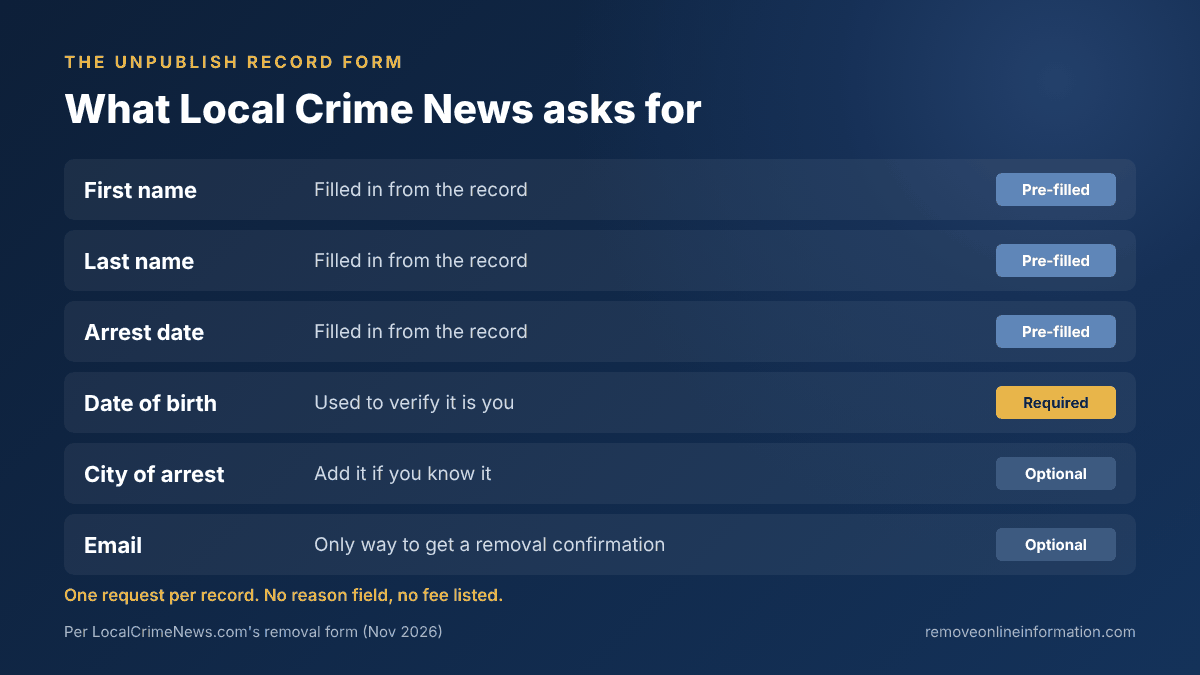
- Check the name and arrest dateThe form fills in your first name, last name and arrest date from the record. Make sure they match the listing.
- Enter your date of birthYour date of birth is required for verification. Add the city of arrest if you know it.
- Add an email for confirmationThe email field is optional, but it is the only way to get a confirmation that the record was removed. The site says it will not use the email for anything else.
- Submit one request per recordClick Submit Request once. The form asks you to submit only one request per record, so repeat these steps on each separate arrest page.
- Wait, then clear Google and BingThe site says requests typically take 2 to 5 business days. Once the page is gone, use the Google Refresh Outdated Content tool, which the site’s FAQ also points to, and the Bing Content Removal tool.
Do not use the contact form for removal: the Local Crime News Contact Us page says unpublish requests submitted there will be ignored. Always use the Unpublish Record button on the record itself.
What to enter, and what to say if something goes wrong
The Unpublish Record form has no reason field. You do not have to explain your case or prove the outcome. What matters is that the details you enter match the record:
Your date of birth
This is the verification step. Enter the date of birth that the arresting agency would have on file. If you use a different date on other documents, use the one from the booking.
Your name and arrest date
These are filled in from the record. Leave them as listed, even if the record spells your name differently than you do.
Your email
Add one you check. It is optional, but it is the only confirmation the site offers.
If the form will not accept your request
The contact form is the only other published channel, and the site says it ignores unpublish requests sent there. Describe the problem with the form instead, and include the record URL.
Sample message about a form problem
I tried to use the Unpublish Record form on [record URL] on [date] and it [would not verify my date of birth / showed an error / did not remove the page after [number] business days]. The record lists my name as [name as shown] with an arrest date of [date]. Please let me know how to complete the unpublish request for this record. You can reach me at [your email]. Thank you.
Know your options
De-indexing vs removal vs sealing vs suppression
| Option | What it does | Does the Local Crime News page go away? | Best for |
|---|---|---|---|
| Removal (Unpublish Record form) | Local Crime News takes the record off its site | Yes, typically within 2 to 5 business days | Anyone with a record on the site |
| De-indexing | Google or Bing drops the URL from search results | No, but it stops showing for searches of your name | Cached results after removal |
| Sealing or a finding of factual innocence | A California court seals the arrest record | Not automatically, you still have to unpublish each record | Eligible arrests; also fixes the official record |
| Suppression | Positive pages push the result down | No, it is still on the site | Results you cannot get removed |
Remove the Local Crime News result from Google
The site’s own FAQ explains that Google caches search results and may take a few days to drop pages that have been removed, and it suggests using Google’s outdated content removal page to speed that up. Once your record page no longer loads, submit the URL to Google’s Refresh Outdated Content tool. For Bing and the engines that rely on it, use Bing’s Content Removal tool.
Search your name again a week or two later. A second arrest record or a copy on another site can surface once the first result drops.
Remove it from AI answers
AI assistants and AI search summaries rely on pages that are indexed and cached. Local Crime News does not say anything about AI tools. In practice, once the record is unpublished and search engines have refreshed, AI tools that browse the web stop finding it, though older cached summaries can linger for a while.
Clean up copies on the publisher’s sister sites and other arrest sites as well, because AI answers often cite whichever copy still ranks.
Timelines
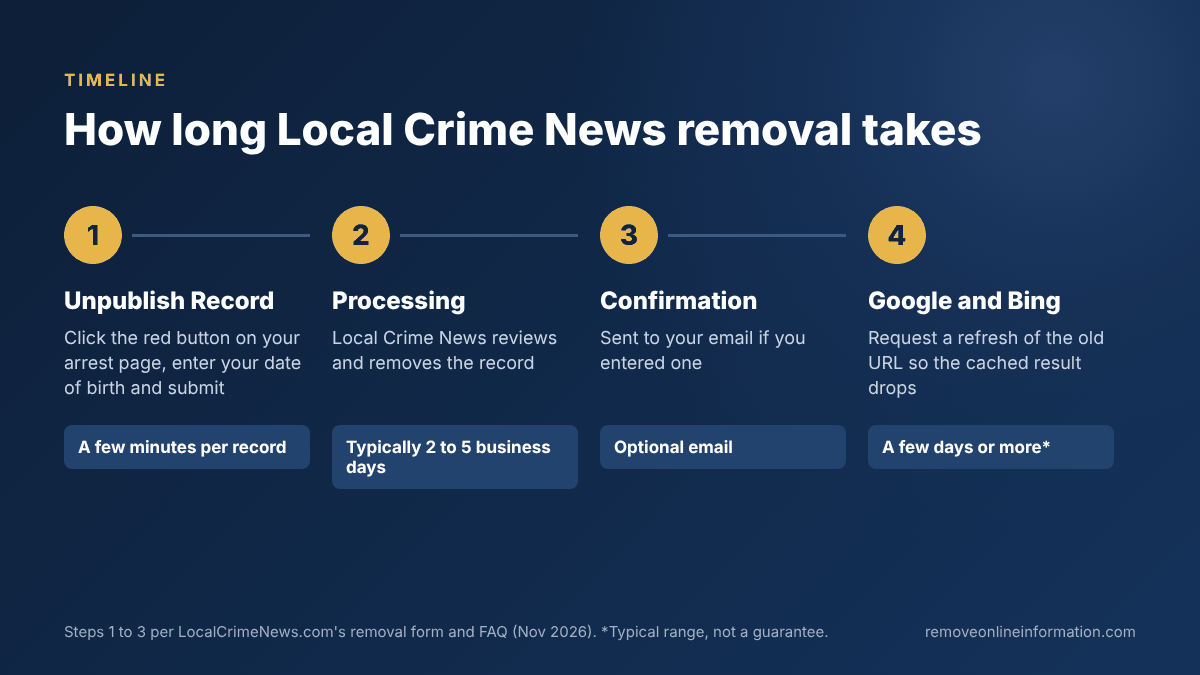
How long Local Crime News removal takes
| Stage | Timeline | Source |
|---|---|---|
| Submitting the Unpublish Record form | A few minutes per record | Form on each record page |
| Local Crime News processing the request | Typically 2 to 5 business days | Local Crime News removal form |
| Confirmation | By email, only if you provided one | Local Crime News removal form |
| Google dropping the old result | A few days, faster with the outdated content tool | Local Crime News FAQ; typical |
| Bing, cached images and AI summaries | Can lag behind Google | Typical, varies by tool |
| Copies on other sites | Separate request for each site | Each site’s own policy |
If the record is still up
- Wait the full 2 to 5 business days the site gives, plus weekends and holidays
- Reload the exact URL in a private window to rule out your browser cache
- Check your email, including spam, for a confirmation
- Check the Previous Arrests list for other records that need their own request
- If one record is still live, use the contact form to report the form problem with the record URL
Why requests stall
- The date of birth did not match what the agency reported
- The request was sent through the contact form, which the site says it ignores
- Only one of several arrest records was submitted
- The same record was submitted repeatedly
- The page is gone but Google still shows a cached copy
- The arrest also appears on sister sites or other arrest sites
Do it yourself or get help
DIY vs RemoveOnlineInformation.com

| Doing it yourself | RemoveOnlineInformation.com | |
|---|---|---|
| Local Crime News records | Free form, one record at a time | We find every record and handle the requests |
| Sister sites and other arrest sites | You search for and contact each one | We map the copies and work through them |
| Google, Bing and AI results | You submit and track each URL | We submit and follow up on outdated results |
| Follow-up if a record stays up | You chase it | We follow up for you |
| Cost | Your time | Free, confidential assessment and a firm quote before any work |
or call (855) 581-5827
FAQ
LocalCrimeNews.com removal questions
Get help
Want your Local Crime News record handled for you?
Tell us about your case. We will review your Local Crime News records, other copies of the arrest and your search results, then give you a free, confidential assessment and a firm quote before any work begins.
RemoveOnlineInformation.com is not a law firm and does not provide legal advice. We are not affiliated with LocalCrimeNews.com or United Reporting. Removing a record from a website does not alter official law enforcement or court records. The Local Crime News policy described here is as of November 2026 and may change.